LCD Screen Cable – Technical Guide & Compatibility
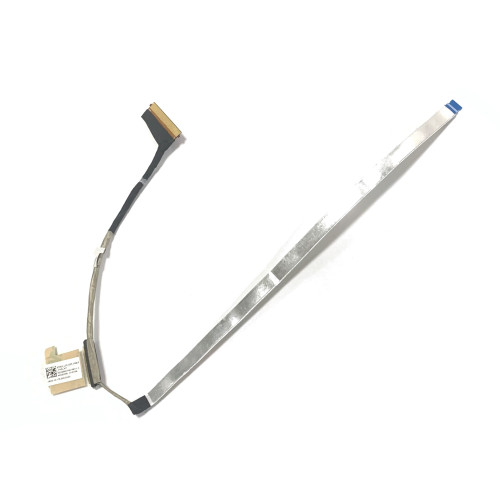
Lenovo 14e Chromebook Gen 2 LCD Cable 30pin 0.5mm FHD DC02003V700 (Model: DC02003V700) is a replacement LCD cable (also called screen cable, eDP cable, or LVDS cable) designed for laptop display connections.
This cable connects the motherboard to the LCD panel, carrying video signals and power for the screen, backlight, and optional peripherals like the camera and IR sensor.
Choosing the correct cable is critical – even a slight difference in pin count, pitch, or interface will result in no display or malfunction.
Technical Specifications:
- Part Number: DC02003V700
- SKU: LT-10027975
- Backlit Type: LED
- Pin Count: 30pin
- Pin Pitch: 0.5mm
- Condition: NEW
- Product Status: Brand New
- Warranty: 90‑day replacement
Compatible Systems (reference):
5C11C12549
DC02003V700
Critical Compatibility Factors – Check These Before Ordering!
- Pin Count – The number of conductors in the cable (e.g., 30‑pin, 40‑pin). Must match the connector on both the motherboard and the LCD panel. Cannot be altered or adapted.
- Pin Pitch – The distance between pins (commonly 0.4mm or 0.5mm). Using the wrong pitch will prevent the cable from seating properly.
- Interface Type – eDP (Embedded DisplayPort) is used in modern laptops; LVDS is older. They are not interchangeable.
- Maximum Resolution Supported – The cable must support the resolution of your screen (e.g., FHD, QHD, 4K). If the cable is rated for a lower resolution, the display may not work at full resolution or may show artifacts.
- Camera / IR sensor connector – Some cables include an extra branch for the camera, IR sensor, or both. Check your original cable for these additional connectors.
- Connector shape and locking mechanism – Even with the same pin count, the physical shape (width, height, keying) may differ between manufacturers.
Understanding eDP vs. LVDS:
- eDP (Embedded DisplayPort) – The modern standard (since ~2012). Uses fewer wires, supports higher resolutions and refresh rates, and includes backlight control. Most laptops since 2015 use eDP.
- LVDS (Low-Voltage Differential Signaling) – Older standard. Requires more wires, limited resolution (typically up to FHD 60Hz). Found on older laptops.
- Always verify the interface type – using an eDP cable on an LVDS panel (or vice versa) will result in no display.
Additional Features – Camera, IR, and Touch:
- Camera connector – Many LCD cables include a separate branch for the webcam. If your original cable has this, the replacement must also have it.
- IR (Infrared) sensor – Used for Windows Hello face recognition. If your laptop has an IR camera, the cable must support the additional data lines.
- Touchscreen data – Some cables include extra lines for touch control. This is rare but check if your screen is a touch panel.
How to Identify Your Cable's Specifications:
- Remove the existing cable (if possible) and inspect the connector. Count the pins (metallic contacts) on the cable end – this is your pin count.
- Measure the pitch – if you have a caliper, measure the distance between two adjacent pins (typically 0.4mm or 0.5mm).
- Check the cable label – some cables have a part number or specification printed on them.
- Look at the motherboard connector – its shape and pin layout can give clues about the interface type (eDP or LVDS).
- Search online – use your laptop model number to find service manuals or forum discussions about the correct cable.
- Take photos – if you are unsure, take clear photos of both ends of the cable and send them to us for identification.
Still not sure which cable fits? Send us clear photos of both ends of your original cable (showing the connector sides) – we will identify the pin count, pitch, interface, and all extra features. For custom orders or assistance, email us at email.